Troubleshooting PC/Geos
GEOS fails with a KR-09 at startup in DOSBox
This one mainly happens when you try older versions of GEOS (e.g. Breadbox Ensemble, GlobalPC) in certain flavors of DOSBox emulators that default to Codepage 858 instead of 437 (e.g. DOSBox-X and probably also DOSBox Staging). This codepage has not been supported by GEOS file system drivers (such as os2.geo and ntfat.geo) until recently (it is now fixed in FreeGEOS), and encountering an unsupported codepage leads to an immediate KR-09 when starting loader.exe.
The fix is to add a line such as keyb gr 437 to the [autoexec] section of your dosbox.conf file. This particular example switches to German keyboard layout (I think the exact layout is irrelevant, as GEOS implements its own layout anyway) and, importantly, to codepage 437, which is supported even by older GEOS versions.
GEOS launches, but you cannot start any apps
This is a curious problem that can be seen with the live demo of Breadbox Ensemble Lite 4.0 on archive.org: The software launches without problems, but app icons are not shown, and when you try to start a program, error code FM-30 is displayed:
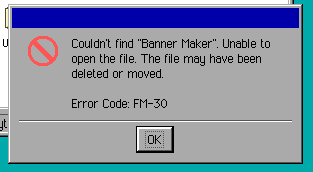
This is caused by putting the top-level folder of GEOS into the root directory of your (emulated) drive, i.e. starting GEOS with a command such as c:\loader.exe instead of c:\ensemble\loader.exe.