Nokia 9000 SDK - a (Geos) Developer's Perspective
Originally published in Handheld Systems, Vol 5.3
The Nokia 9000 Communicator was the latest publicly available addition to the family of handheld devices running the Geos operating system. Even though the Communicator had already been introduced on the CeBit 96 trade show last spring, it has only recently become more attractive to a wider community of developers after Geoworks and Nokia decided in January to offer an »evaluation version« of the SDK for $100, in addition to the full-featured training and support package for $8000.
As an all-in-one combination of mobile phone, organizer and »internet appliance«, the Nokia 9000 is still largely unparalleled. For this reason alone, and also because the Communicator is currently the Geos platform receiving the largest amount of public exposure, the device is a worthwhile target for developers wanting to put their experience in Geos programming to good use.
Toshiba recently announced another Geos-based device with a similar feature set, called »Genio«, which comes in a slightly larger form factor and is specially targeted at the Japanese market - so far, it has not been announced whether the Genio platform will initially be opened to third-party development at all.
Bearing in mind that this was probably not the last announcement of its kind, the Nokia 9000 can also be seen as the first opportunity to get used to a new type of handheld device, offering communications and remote access in addition to simple data storage.
What's New
For a Geos developer, the most important difference between the Nokia 9000 and previous Geos platforms is that the Nokia is the first device to use version 3.0 of the operating system. Even though the name suggests differently, the new version consists mostly of additions to the core system rather than radical design changes and incompatibilities (unlike the update from Geos 1.x to 2.0).
Version 3.0 brings two mains additions to the list of standard services offered by the system:
- The Mailbox library: this subsystem offers a unified interface to all kinds of things which can be described in terms of »sending« and »receiving« from the users perspective. This includes email, faxing, printing and, on the Nokia, messaging through the SMS service (which has already been discussed in more detail in the previous issue of Handheld Systems). In addition to using a variety of »transport mechanisms«, messages can also come in different storage formats (like flat or VM files), and, similar to clipboard items, have an associated content data type.
- Sockets: these provide an abstract layer for communications with other devices, which is largely independent from the physical medium and the protocols and addressing schemes used. Of course, most people nowadays will associate sockets with buzzwords like Internet, TCP/IP and PPP connections, which is also their most important use on the Nokia. In addition, the Communicator uses them to implement infra-red data links using the IRLAP protocol.
Of course, the socket library also brings along a couple of friends, for example library to maintain a list of »access points« (Internet providers, Terminal hosts etc.) with their individual settings, and a set of controllers for entering destination addresses for each connection type.
New Looks
To improve user-interface consistency across applications, most of the standard dialog boxes (like the progress indicator) found in the built-in programs of the Nokia have been made available to developers through the »Foam« user interface library. Generally, they do not offer any substantial additions to the Geos user interface itself, and they are not integrated with the Generic User Interface concept, but they give easy access to a number of »nice to have« features.
Apart from the set of standard dialogs, there are two noteworthy concepts used by most of the Foam user interface tidbits:
- The function
PutUpDialogViaUIThread()brings up a dialog that is duplicated from a template resource and will be run by the specific UI thread (to avoid blocking the application's threads). Dialogs created by this function are usally destroyed again once they are dismissed. The idea of this concept is to save system resources by avoiding large numbers of dialogs hanging around in memory unusued, while still being attached to the applications UI tree. ComplexMonikerClassshows a clever use of variant classes: it can be used to modify the behavior of any Gen object, offering a way for more sophisticated control over its moniker without having to create it as a custom-drawn Gstring. In addition to a choice of fonts, point sizes and hints, a ComplexMoniker can also assign one of a large number of standard monikers to an object (consisting of both a bitmap and a text), improving consistency among applications as well as making them easier to localize.
In contrast to previous Geos platforms, the Nokia 9000 does not have a file manager style application any more which could be used to start new programs.
Instead, there are three »master« application screens (system services, connectivity services and »extras«) which maintain a list of sub-applications for the user to choose from. After terminating, a sub-application will typically pass back control to the screen it was launched from. To work properly with this mechanism, an application should no longer have a GenApplicationClass object at the head of its generic tree, but rather use the new FoamSubApplicationClass which takes care of all the details.
As a result of this, even simple applications will normally not be binary-compatible between the Nokia and other Geos platforms any more. On the other hand: because of the different modes of user interaction, any multi-platform application will require at least its generic tree to be optimized for the Nokia anyway. Always remember - the Nokia has no stylus, and complex things like a GenDocument controller just don't belong there...
The Contact Database
While on the OmniGo the format of the built-in address book was not documented, the Contact Database of the Communicator is designed as a shared resource for storing all kinds of contact information, like names, phone numbers and mail addresses. Any application can use the contdb library to access and modify the contents of this database.
In addition to this, the Contact Log tracks all recent communications through voice, fax or data. Together with the standard controllers for selecting items from such a list, it would be very simple to write, for example, an application where you can choose a name from the list of people whose calls you missed recently, and the program then sends a standard excuse to their email address, if available.
One could say that the Contact database does not offer any new technical excitements, except maybe for yet another Geos database interface in addition to the flat-file library and HP's adaptation of their 100/200LX database model used on the OmniGo (which is also present on the Nokia, though well hidden underneath the cloak of the world time clock). Anyway, it offers an easy tool for taking advantage of the tight integration of the Device's phone and data components.
A Familiar Sight
The first version of the (still DOS-based) SDK shows little difference to earlier releases for other Geos platforms: the list of available documentation has once again changed a little, with the ESP and Assembly Language API books being gone again, together with the rudimentary Device Driver Development kit, which wouldn't make much sense on a physically closed unit anyway. Also, some of the object classes which are not easily applicable to the Nokia design have been left out (like Spreadsheets, Printing and GenDocuments). Instead, there is a new book (misleadingly called »SMS Toolkit« in the first release) which introduces some, but not all of the new features.
If you want to sample some of the new documentation for free, you should have a look at the Developer Relations section of http://www.geoworks.com/, where the PDF (Adobe Acrobat) versions of the documentation are available. Anyway, it should be kept in mind that even on the SDK distribution CD, the contents of PDF and ASCII documentation are not always identical: for example, the chapter on the socket library is missing from the PDF version of the Concepts book, but included in the ASCII version.
The proprietary GPK installation concept of the OmniGo has been abandoned in favor of an open file format that is based on files being packed into a tar archive together with a description file. These packages can also be downloaded and installed directly from an Internet server to the device. As an alternative, they can first be loaded to a PC and then transferred to the Communicator.
Interestingly, the PC linkup of the Communicator over a serial or infra-red line reverses the old PCCOM design where the portable device acted as a server and is controlled by the PC: all transfers are now initiated rom the phone side. The idea behind this may be that the server application on the PC can be left running all the time, which should especially facilitate the handling when used with wireless IR transfer.
As usual, the SDK comes with a »Nokia emulator« which contains all the applications and libraries available on the phone, but which can be run on a desktop PC as a full-screen DOS application. (As a matter of fact, this article was written without a real Communicator at hand, but in the past the SDK emulators have turned out to be very true to life, except for processing speed and hardware-specific issues.)
One thing I noticed when trying to run the emulation under OS/2 was that the os2.geo file system driver was missing from the SYSTEM\FS directory. Anyway, it can be easily transferred from another Geos version, for example the one in \TARGET\GEOS2NC\SYSTEM\FS on the SDK CD.
Going Networked
Of course, one of the first things I wanted to do after receiving the new SDK was to try and make the Nokia emulation connect to my Internet service provider, in order to be able to test the new communications features of Geos 3.0.
It turned out that this wasn't as easy as expected, particularly for two reasons:
- The SDK documentation does not even attempt to tell you how the Nokia's protocol stack can be used with any other hardware than the Communicator itself, even though from a Geos perspective, the data communications part of the Nokia is hardly more than a serial port with an AT-command modem attached to it.
- All the ISPs available to me use some kind of log-in script before exposing the actual PPP connection, asking for things like name and password beforehand rather than relying on PPP-based authentification. On the other hand, there is no trace of scripted login support either on the Nokia or in the emulation.
Obviously, this also imposes a limit on the choice of ISPs available for mobile Nokia users.
While the solution to the second problem requires a considerable amount of re-engineering and trickery (and is still being worked on), the first issue can be sorted out largely by manipulating the GEOS.INI file. The following description assumes that the modem is connected to COM1, because a connection to another COM port seemed to conflict with the infrared driver - probably, this can also be solved by changing the NET.INI file.
- First, add the following entries to the GEOS.INI file:
[serial]
; assuming standard IRQ of COM1:
port1=4
[My Modem]
port = COM1
[ppp]
portDriver = Serial Driver
; or "EC Serial Driver" on the error checking build port = 0- Next, go to the SYSTEM directory, back up the old
vser.geofile and copy serial.geo tovser.geo(EC version: file names arevserec.geoandserialec.geo).
These changes will make sure that both the terminal application and the TCP/IP stack use the modem on COM1. Probably because of the history of the code, the PPP driver is containing a hardcoded link to the system modem driver, while the terminal application (still showing signs of its GeoComm heritage) talks directly to the serial port.
Now you can use the Settings command on the Services application screen to set up your network access (together with individual settings for the various application), which is fairly straightforward if you are a little familiar with TCP/IP terminology.
Because tone and pulse dialing have no meaning in GSM, the dialing command sent by the Nokia applications is usually »ATD«, followed by the phone number.
If you experience problems with your modem's default choice of dialing method, you should look for the phone number in your INI file (under one of the [accessPointXXXX] headings) and prefix it with a »P« or a »T« there.
For debugging your PPP connection, you can add the line
Debug = 11
to the [ppp] section of your GEOS.INI file, which causes a log file named PPP.LOG to be created in DOCUMENT\OWN_TEXT.000. If the amount of debugging output is too detailed, you can also reduce the debugging level to 8 or below. Please note that you have to be somewhat intimate with PPP concepts to get much sense of this information...
I found that with some providers, the LQM (Line Quality Measurement) option of the PPP protocol would cause problems. It can be turned off by adding the line
lqm = FALSE
under [ppp].
As said, you will not be able to use one of the large online services as ISP at this time because of the lack of scripting support.
Sneak Preview: the New Windows/NT Based SDK
Shortly before the deadline for this article, I received a preview version of the »next generation« Nokia SDK, version 1.1. This was still without documentation, but from the accompanying readme file, it was clear that many new areas of the system will be added, especially those specific to the Nokia Communicator.
The largest change in the SDK comes in form of the hardware and software requirements: all the tools are now Windows/NT command line applications, replacing the old and sometimes cumbersome DOS extender (the old DOS tools will still be available, but Geoworks seems to be hoping for developers to move to NT rather quickly).
Two Becomes One
At the same time, the new version of the SDK takes advantage of the DOS-session multitasking of Windows NT, making it possible for the first time to run both the Swat debugger and the session to be debugged on the same machine.
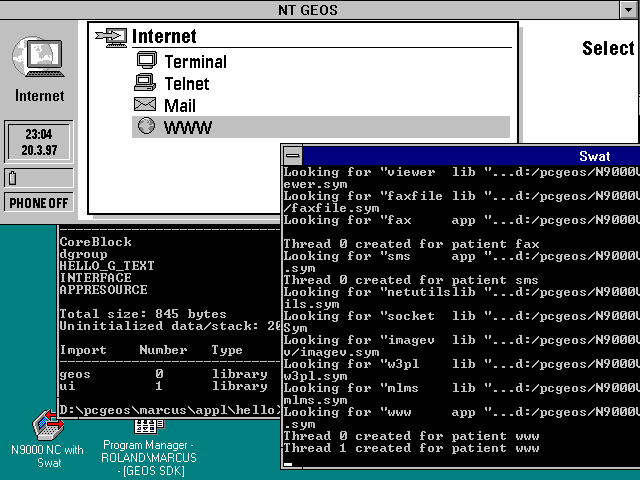
The advantage of this is obvious: there is no more need for a separate target PC which has to be hooked up via serial connection. Instead, all the communications between the two sessions, which still run in different address spaces, takes place through a named pipe, which makes attaching to a local session just blazingly fast. At the same time, the (usually faster and more expensive) host can also be used for running the target code, allowing for higher error checking levels while maintaining responsiveness of the application.
To avoid the need for switching between full screen sessions, the emulator also uses a specific video driver which redirects all graphics output to a floating window on the NT desktop, which in turn sends back keystrokes into the Geos session.
I found that other than the »usual« requirements for running Windows/NT (16 MB of RAM being the absolute minimum, with the fun starting around 32 MB) there were no additional hurdles imposed by the new SDK. Even though it uses long filenames in many places, it will also install over a FAT partion, and it worked fine with my old Borland C++ 3.1 compiler.
The installation is now a fairly complex multi-stage process, consisting of directory creation, file expansion, and environment settings, occasionally using a little help from a Perl interpreter that comes with the package.
Anyway, except for a few items the documentation tells you to fix by hand at the moment, most of this is quite painless when using the setup program on the CD.
In contrast to earlier versions of the SDK, I'd recommend following the advice of the documentation telling you to go through the installer instead of copying the files manually (especially if you are an NT novice like myself).
Tool chest
Looking over the BIN directory, where there are often hidden gems to be discovered, the version held a few little surprise, in the form of additional command line »goodies« from Geoworks:
- CVTPCX.EXE: converts PCX pictures to Geos bitmap source code
- DUMPGEO.EXE: dumps geodes (header information, relocations, resources)
- HCPIC.EXE: converts PCX pictures to assembly language instructions
- NIM2PC.EXE: converts Nimbus and bitmap formats to Geos fonts
- PRINTOBJ.EXE: dumps SYM and other Geos files. This program could also be found in earlier versions, but it has a small online help now.
- PVM.EXE - dumps directories of VM files
These programs usually tell quite a lot about themselves if simply called with either no parameters or something like »-help«. It seems that porting from Unix to NT is easy enough for Geoworks to bring over some of their own tools for the development process.
Another useful tool can be found in the Extras application of the emulations: a simple INI editor for the Nokia, giving access to the complete set of GEOS.INI entries at runtime. This is especially interesting on a real Communicator, which is very hard to catch in a state where it is not running Geos, effectively locking its INI file against all modifications except those carried out by native Geos applications.
New WORLD Order
The standard installation of the earlier Geos SDKs created a directory structure which mixed symbol files for original applications on the target platform with sample programs and the user's own projects. Only the hardly-documented LOCAL_ROOT environment variable permitted the creation of two separate development trees, one for the user and one for the SDK (making reinstallation and backup slightly easier).
In contrast, the new SDK creates a number of sub-trees below the root of the SDK installation directory, to differentiate between code from various sources:
- The old »Include« directory has been replaced by separate Cinclude and Include directories for GOC and ESP includes, respectively.
- In addition to directories for common system components, there can be multiple »branches« for the different platforms. Currently, the CD contains only N9000V11, but this concept could be expanded for installing multiple SDKs in one directory tree.
- Source files and symbols are divided into »Installed« files (which refer to data associated with the actual machine, like symbol and LDF files) and »other« files, like sample code.
- During the installation process, the program asks for a path in which to create an »engineer's« personal files. This path contains again separate directories for projects, include files, and also specific copies of the target emulations. The root of this directory contains a file named BRANCH selecting the platform specific files to be used when compiling.
This concept has clearly been designed to support joint development in network environments (for completeness, you would still require a version control system to check files in and out between »private« and »shared« parts of the tree). Geoworks seem to be serious about implementing this idea: for example, the make files strictly keep you from compiling code outside your local branch.
A Lot to Read
The readme file of the preview copy promises a number of new chapters in the Nokia 9000 specific docs (formerly SMS) which go beyond the information found in the first version and cover things that have so far been available only to attendees of Geoworks classroom trainings:
- Targeted SMS messages (in addition to the user, also applications on the device may receive their own SMS messages)
- Sending faxes and email.
- Direct access to the serial ports and the built in modem.
- Access to the IMEI serial number of the phone.
I found another interesting piece of information in that readme file: the text often refers to »recent versions of the Nokia 9000 communicator« which support additional features in certain libraries, indicating that there is a constant process of silently updating the firmware of the device.
This is certainly an indication of the commitment to the product from both Nokia and Geoworks (for example, the HP OmniGo 100 was updated only once in its life cylce). On the other hand, this will require you to pay special attention the exact version of the platform your application is running on.
Even though Geoworks still intends to make the new information available as a DOS-based SDK as well, switching to the NT based SDK is an option worth considering: for once, because of the technical advantages the new version offers, like improved speed and easier handling.
But in addition to that, there is another factor that shouldn't be forgotten: it looks as if Geoworks wants to move their internal development from the Unix platform to the NT based version of the SDK. And judging from past experience, those components of the SDK that were also used internally by Geoworks always were those with the highest quality and the fewest bugs...